Active Directory Group Attributes List
This page is a reference that maps the attributes of Active Directory group objects to the tabs of the Windows Server 2008 “Active Directory Users and Computers” (ADUC) interface. Each section shows a screenshot of the tab, followed by a table of which LDAP attribute each field corresponds to. Use it when writing PowerShell scripts, building LDAP queries, or mapping groups in IAM/provisioning integrations.
For the same mapping on user objects, see Active Directory Attributes List.
Source and images: SelfADSI – Attributes for AD Groups (Windows 2008)
Table of Contents
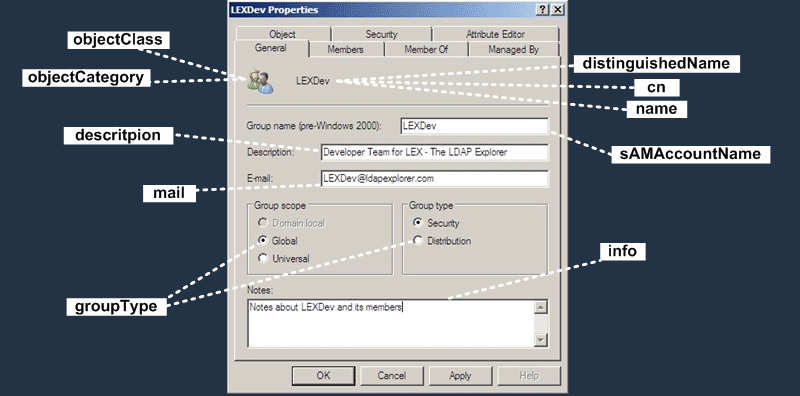
General Tab
| UI Field | LDAP Attribute Name | Description |
|---|---|---|
| Group icon (object class) | objectClass | Class of the object (group) |
| Group icon (object category) | objectCategory | Category of the object (points to the Group class in the schema) |
| Group name (title) | distinguishedName | Full path of the object in the directory (e.g. CN=LEXDev,CN=Users,DC=...) |
| Group name (title) | cn | Common Name |
| Group name (title) | name | RDN (Relative Distinguished Name) value |
| Group name (pre-Windows 2000) | sAMAccountName | Pre-Windows 2000 (NetBIOS) group name |
| Description | description | Description of the group |
| E-mail address of the group | ||
| Group scope / Group type | groupType | Scope (Domain local, Global, Universal) and type (Security, Distribution) stored in a single bit field |
| Notes | info | Free-text notes about the group |
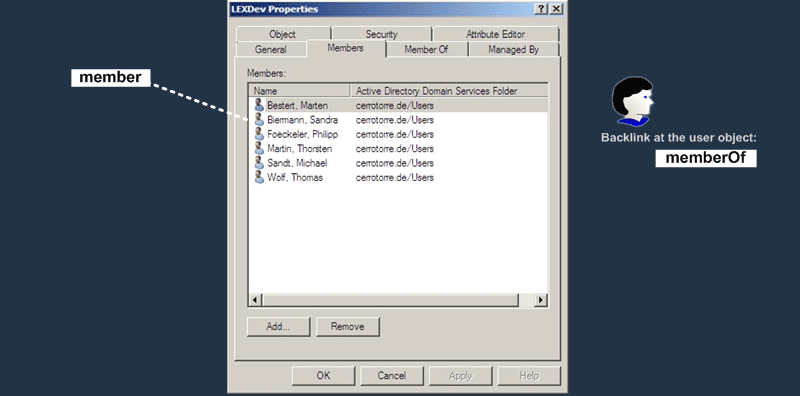
Members Tab
| UI Field | LDAP Attribute Name | Description |
|---|---|---|
| Members | member | List of DNs of the user/group/computer objects that belong to the group |
| (Backlink) | memberOf | Backlink on the user object; calculated automatically from member and cannot be written directly |
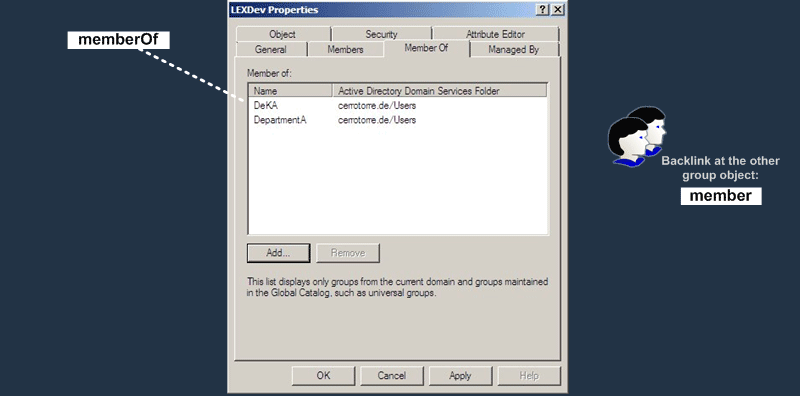
Member Of Tab
| UI Field | LDAP Attribute Name | Description |
|---|---|---|
| Member of | memberOf | List of DNs of the parent groups this group belongs to |
| (Backlink) | member | The matching membership entry on the other group object (this group appears in the parent’s member list) |
Note the text at the bottom of the tab: the list only displays groups from the current domain and groups maintained in the Global Catalog, such as universal groups.
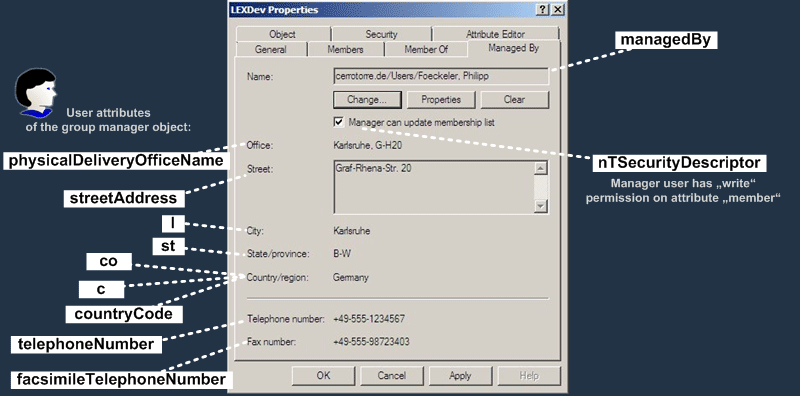
Managed By Tab
This tab shows attributes of the user who manages the group, so most fields below are attributes of the manager user object, not of the group.
| UI Field | LDAP Attribute Name | Description |
|---|---|---|
| Name | managedBy | DN of the user/group managing this group (attribute on the group) |
| Manager can update membership list | nTSecurityDescriptor | When checked, the manager gets write permission on the member attribute |
| Office | physicalDeliveryOfficeName | Office of the manager user |
| Street | streetAddress | Street address of the manager user |
| City | l | City |
| State/province | st | State/province |
| Country/region | co | Country name |
| Country/region | c | Two-letter country code (ISO 3166) |
| Country/region | countryCode | Numeric country code |
| Telephone number | telephoneNumber | Telephone number |
| Fax number | facsimileTelephoneNumber | Fax number |
Object Tab
| UI Field | LDAP Attribute Name | Description |
|---|---|---|
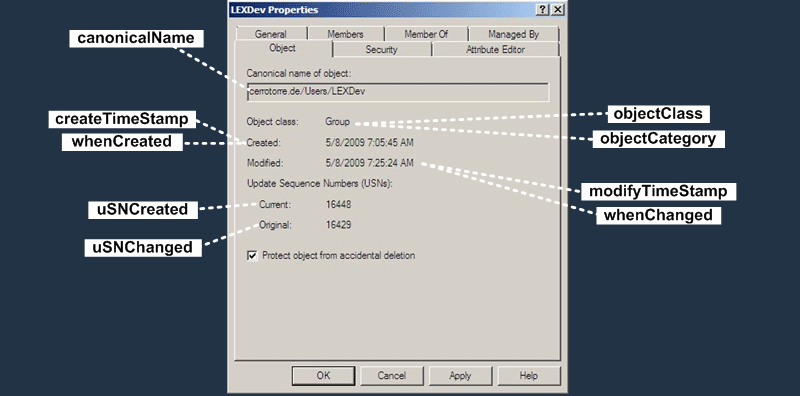
| Canonical name of object | canonicalName | Path of the object in domain/OU/name form (constructed attribute) |
| Object class | objectClass | Object class (group) |
| Object class | objectCategory | Object category |
| Created | whenCreated | Time the object was created |
| Created | createTimeStamp | Creation time (operational attribute, same information as whenCreated) |
| Modified | whenChanged | Time the object was last modified |
| Modified | modifyTimeStamp | Last modification time (operational attribute) |
| Update Sequence Numbers – Current | uSNCreated | Update Sequence Number (USN) at the time the object was created |
| Update Sequence Numbers – Original | uSNChanged | USN at the time of the last change (used by replication) |
The screenshot also shows the Protect object from accidental deletion checkbox; it adds a Deny entry to the object’s ACL that prevents deletion.
Security Tab
| UI Field | LDAP Attribute Name | Description |
|---|---|---|
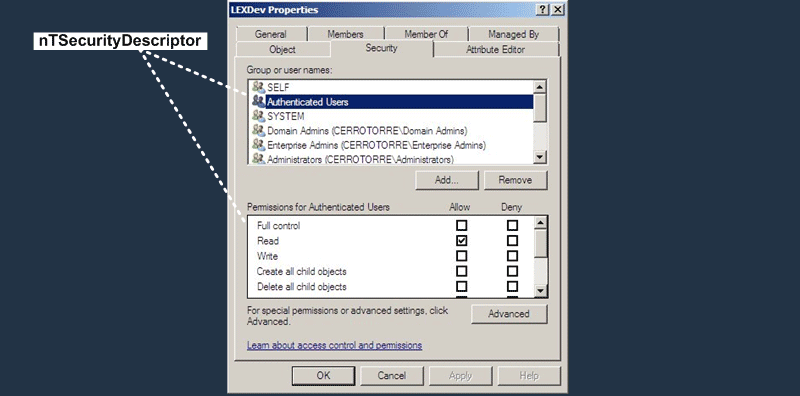
| Group or user names / Permissions | nTSecurityDescriptor | Security descriptor of the object: owner, DACL (who can do what) and SACL (auditing) |
The whole list of users/groups and the permission checkboxes on this tab are the visual representation of a single attribute, nTSecurityDescriptor.
Attribute Editor Tab
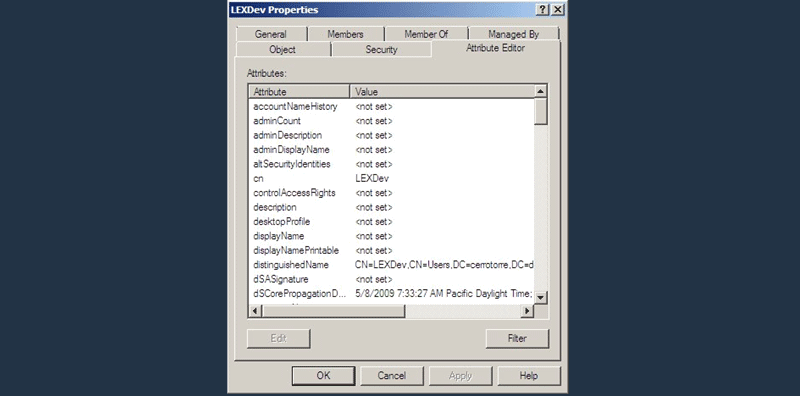
This tab gives low-level access to all attributes of the group object. It is the functionality that the ADSI Edit tool provided in former Windows/AD versions, now built into ADUC (View > Advanced Features must be enabled to see it). It is useful but basic for viewing and editing low-level directory data; a specialized LDAP browser such as LDAP Explorer is more comfortable.
The first attributes in the list shown in the screenshot are:
| LDAP Attribute Name | Example Value |
|---|---|
| accountNameHistory | <not set> |
| adminCount | <not set> |
| adminDescription | <not set> |
| adminDisplayName | <not set> |
| altSecurityIdentities | <not set> |
| cn | LEXDev |
| controlAccessRights | <not set> |
| description | <not set> |
| desktopProfile | <not set> |
| displayName | <not set> |
| displayNamePrintable | <not set> |
| distinguishedName | CN=LEXDev,CN=Users,DC=cerrotorre,DC=de |
| dSASignature | <not set> |
| dSCorePropagationData | 5/8/2009 7:33:27 AM Pacific Daylight Time |
Source
The screenshots and attribute mappings in this post come from the “Attributes for AD Groups (Windows 2008)” page on SelfADSI, extended with descriptions. Image rights belong to SelfADSI / CerroTorre Networking.