Blocking RDP Port 3389 in an Active Directory Domain
Today, most medium and large companies use Active Directory to centrally manage their users and computers. Alongside this, we also build in a number of security measures, especially on user computers.
One of the most important of these security measures is Remote Desktop Protocol (RDP), which we can also simply refer to as port 3389. What matters here is not just blocking port 3389 itself, which has effectively become the standard TCP port for this, but also keeping in mind that RDP connections can be blocked through other methods as well.
In this post and video, we’ll walk through a short demonstration covering the scenario where we prevent a domain-joined device from making connections on port 3389.
First, we log in as Administrator on a machine that has the Active Directory management console.
Opening the Group Policy Management Console
- We open the Start menu and launch Group Policy Management (GPMC).
- To block the RDP port connections, we select “Create a GPO in this domain, and Link it here” at the root.
- We can give the GPO a meaningful name (e.g. “Restrict Outbound RDP to Internal IPs”).
Creating the Firewall Rule
Editing the GPO
- We right-click the GPO we created and select Edit.
- We navigate to Computer Configuration > Windows Settings > Security Settings > Windows Firewall with Advanced Security > Outbound Rules.
- We right-click and select New Rule.
Choosing the Rule Type
- We select Port and click Next.
- We select the TCP protocol and enter 3389 in the Specific local ports box.
- We click Next.
Restricting the Connection
- We select Block the connection and click Next.
Defining the Exceptions
- In the profile settings, we select all of Domain, Private, and Public.
- Click Next.
Naming the Rule
- We give the rule a name.
- We click Finish to complete the process.
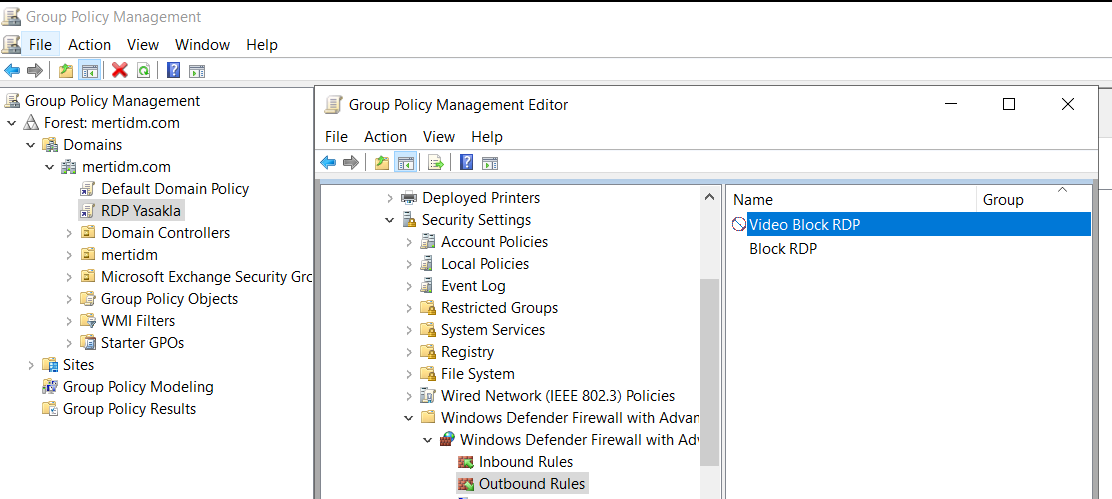
Applying the GPO to the Target Computers
I log in to a sample device on the domain and type the following command into the cmd prompt. This pulls all the updates down onto my test device.
gpupdate /force
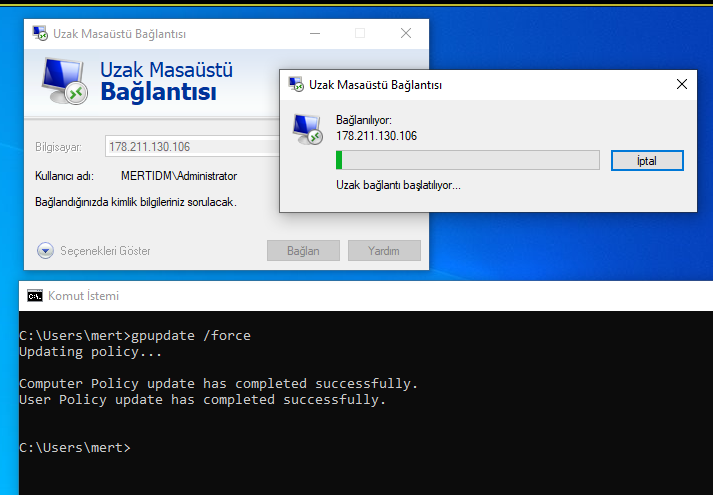
As a result, we’ve blocked outbound connections from our domain-joined computers on port 3389. You can think of this as just one of the simplest links in the chain of security measures I mentioned at the start of this post.