Hypervisor Type 1 vs Type 2
When working with computer systems, we often have to manage more than one environment at once. This is where virtualization tools make our lives a lot easier.
Many of us actively install tools like VMware or Oracle VM VirtualBox on our own machines. We use them to try out systems like Ubuntu, Debian, or Kali Linux. But we often overlook the fact that these tools actually fall into a specific classification.
Terms like “Type 1,” “Type 2,” and “Bare-Metal,” which come up in meetings or technical documents, can seem confusing at first glance. In reality, these terms carry distinct meanings.
Type 1 (Bare-Metal Hypervisor)
The term “Bare-Metal” can sound pretty technical and complicated the first time you hear it. But the underlying idea is quite simple.
In everyday use, we generally follow this scenario:
- An operating system (say, Windows) runs on our computer
- We install a virtualization tool on top of it
- We run our virtual machines through that tool
In the enterprise world, though, things work a bit differently.
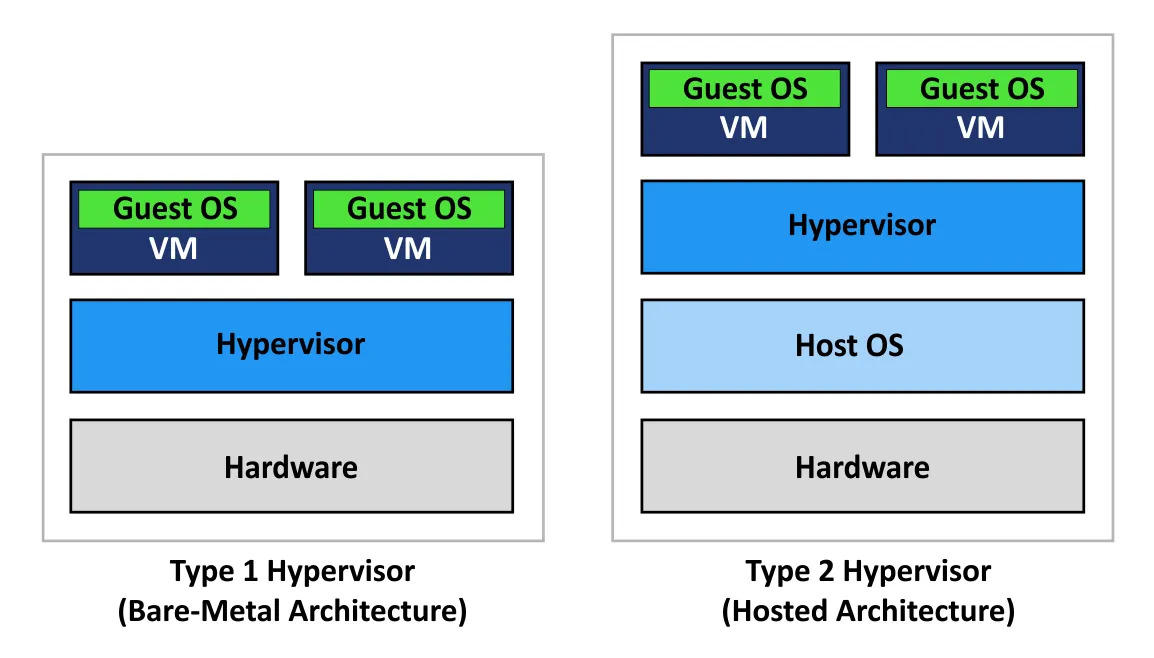
A Type 1 (Bare-Metal) Hypervisor refers to a virtualization architecture that runs directly on the hardware, with no operating system layer in between.
Characteristics
- Runs directly on physical hardware
- Delivers higher performance
- Stronger from a security standpoint
- Widely used in data centers and enterprise environments
Examples
- VMware ESXi
- Microsoft Hyper-V
- KVM
- Xen
Type 2 (Hosted Hypervisor)
As the name suggests, a “Hosted Hypervisor” is a virtualization model that runs on top of a host operating system.
Here, the “host” is generally:
- Our own computer
- Or the main operating system on which the virtualization software runs
For example:
- Windows 10 runs on our computer
- We install a virtualization application on top of it
- We manage our virtual machines through that application
This setup is especially practical for developers and individual users.
Characteristics
- Installed on top of an operating system
- Easy to install and use
- Ideal for development and test environments
- Slightly lower performance compared to Type 1
Examples
- Oracle VM VirtualBox
- VMware Workstation
- Parallels Desktop
Quick Summary
- Type 1 (Bare-Metal): Runs on the hardware → Higher performance, suited for enterprise use
- Type 2 (Hosted): Runs on top of an operating system → More practical, suited for individual use