Managing Multiple LDAP Connections From a Single Application
In Identity and Access Management (IAM) systems, we work in connection with many downstream applications. One of the most important of these, Active Directory, is an LDAP-based directory management system. Oracle LDAP is a similar system, also letting you manage users and groups.
So how do you easily handle things when you need to manage 4-5 LDAP connections at the same time? Managing multiple LDAP connections from a single application is a highly practical, time-saving solution in the daily workflow of IAM administrators.
One of the most commonly used tools for this need is Apache Directory Studio, which I also use frequently in my day-to-day work.
A Quick Look at Apache Directory Studio
Apache Directory Studio is a popular application used to manage multiple LDAP directories from a single screen. For example, you can connect to systems like Active Directory, Oracle LDAP, and OpenLDAP all through one application and perform queries and edits.
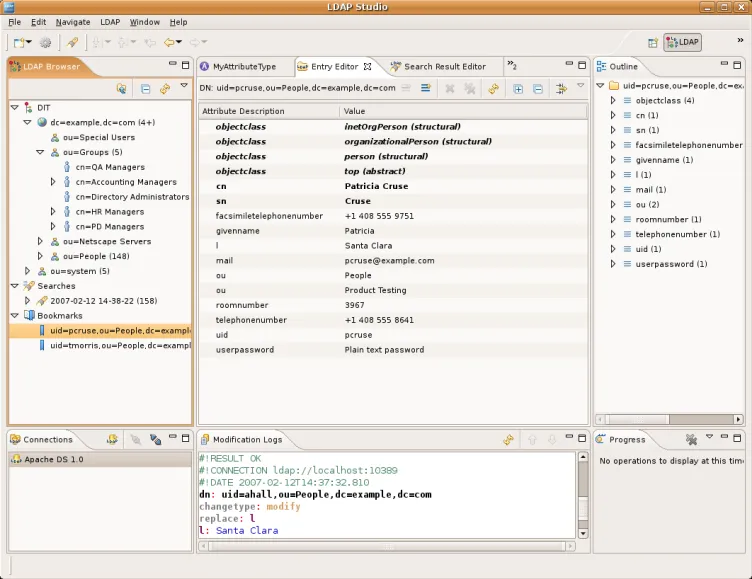
To establish an LDAP connection, you need the connection details for the LDAP directory you’re connecting to. You can connect by signing in with the LDAP hostname, port, username, and password. Depending on the permissions configured within the LDAP directory, you can perform operations within the scope of your own authorization. For example, if you’re not responsible for LDAP administration and have only been granted IAM administrator rights, you may only have read/view access to the LDAP directory. This lets you check whether IAM and LDAP are working correctly together.
So what kind of checks do people actually run? Let’s say, for example, that you’ve added a user to a group within the LDAP directory. If the IAM system shows that granting a permission to a user succeeded, but you need to confirm it for certain — especially if you’ve just integrated the system or need to verify the operation — you can open the relevant LDAP connection in Apache Directory Studio and instantly query whether the user is actually a member of the group you added them to from IAM. This way, you can confirm whether the group-membership change actually went through successfully in the LDAP directory.