Strong Password Storage Policies
There are many ways to protect passwords from attackers. In this post, we’ll go over those methods.
Why Should We Protect Passwords When We Store Them?
When storing passwords, we need to protect them from unauthorized access, keep them safe against potential attacks, and store them correctly in our data stores to guard against data breaches. When we store passwords in a database, we must never keep them as an exact copy of what the user typed. For example, if a user sets their password to Deneme123, and we store it in the database as Deneme123 in plain text, then anyone who gains access to that database can read every password. They could then try that same password against the user’s accounts on other applications and take over all of those accounts from a single leak. To prevent this, we need to use various methods when storing passwords in a database.
1. Encrypting
In encrypted form, passwords can only be accessed by authorized systems or users who are logged in and who use the decryption method. Encryption algorithms secure user passwords using complex mathematical algorithms such as AES (Advanced Encryption Standard) or RSA (Rivest-Shamir-Adleman).
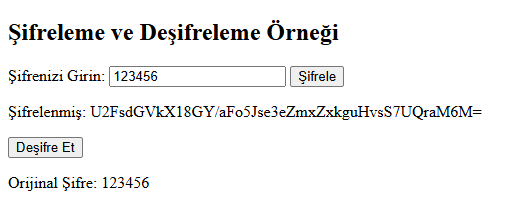
In the example below, a password is encrypted using AES (Advanced Encryption Standard) and then decrypted back to its original form.
<!DOCTYPE html>
<html lang="en">
<head>
    <meta charset="UTF-8">
    <meta name="viewport" content="width=device-width, initial-scale=1.0">
    <title>Şifreleme Örneği</title>
    <script src="https://cdnjs.cloudflare.com/ajax/libs/crypto-js/4.1.1/crypto-js.min.js"></script>
</head>
<body>
    <h2>Şifreleme ve Deşifreleme Örneği</h2>
    <label for="password">Şifrenizi Girin:</label>
    <input type="text" id="password" placeholder="Şifre" />
    <button onclick="encryptPassword()">Şifrele</button>
    <p id="encrypted"></p>
    <button onclick="decryptPassword()">Deşifre Et</button>
    <p id="decrypted"></p>

    <script>
        let encryptedPassword;

        // Encryption step
        function encryptPassword() {
            const password = document.getElementById("password").value;
            const secretKey = "gizliAnahtar"; // Key used for encryption
            encryptedPassword = CryptoJS.AES.encrypt(password, secretKey).toString();
            document.getElementById("encrypted").innerText = "Şifrelenmiş: " + encryptedPassword;
        }

        // Decryption step
        function decryptPassword() {
            const secretKey = "gizliAnahtar"; // The same key must be used for decryption
            const decrypted = CryptoJS.AES.decrypt(encryptedPassword, secretKey);
            const originalPassword = decrypted.toString(CryptoJS.enc.Utf8);
            document.getElementById("decrypted").innerText = "Orijinal Şifre: " + originalPassword;
        }
    </script>
</body>
</html>
2. Hashing
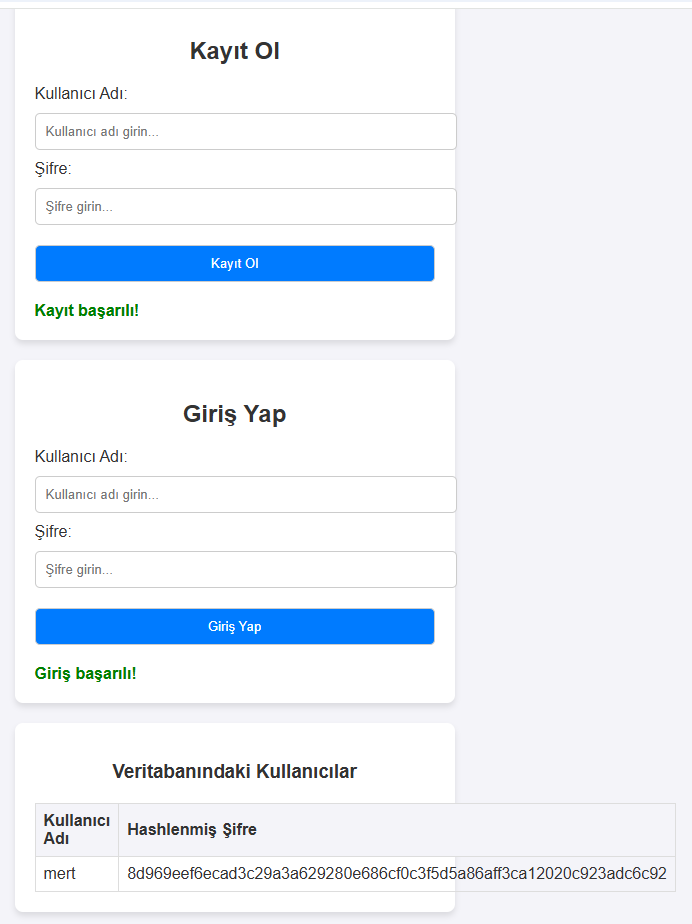
Hashing is one of the preferred, secure methods for storing our passwords in a database. We can store a password in the database using an algorithm such as SHA-256. Unlike encryption, hashing cannot be reversed or decrypted, which makes it an ideal method for passwords that don’t need to be retrievable as plain text.
Below you’ll find a nice, simple example using the SHA-256 method. In the screenshot, a user named mert sets the password 123456 and then verifies that password the same way shown below. At the bottom you can see how the password is stored in the database using SHA-256.
<!DOCTYPE html>
<html lang="en">
<head>
    <meta charset="UTF-8">
    <meta name="viewport" content="width=device-width, initial-scale=1.0">
    <title>Kullanıcı Login Mekanizması</title>
    <style>
        body {
            font-family: Arial, sans-serif;
            margin: 50px;
            background-color: #f4f4f9;
            color: #333;
        }
        .container {
            max-width: 400px;
            margin: auto;
            padding: 20px;
            background: #fff;
            box-shadow: 0 4px 6px rgba(0, 0, 0, 0.1);
            border-radius: 8px;
            margin-bottom: 20px;
        }
        h2, h3 {
            text-align: center;
        }
        input[type="text"], input[type="password"], button {
            width: 100%;
            padding: 10px;
            margin: 10px 0;
            border: 1px solid #ccc;
            border-radius: 5px;
        }
        button {
            background-color: #007bff;
            color: #fff;
            cursor: pointer;
        }
        button:hover {
            background-color: #0056b3;
        }
        .message {
            margin-top: 10px;
            font-weight: bold;
        }
        .success {
            color: green;
        }
        .error {
            color: red;
        }
        table {
            width: 100%;
            border-collapse: collapse;
            margin-top: 20px;
        }
        table, th, td {
            border: 1px solid #ddd;
        }
        th, td {
            padding: 8px;
            text-align: left;
        }
        th {
            background-color: #f4f4f9;
        }
    </style>
</head>
<body>
    <div class="container">
        <h2>Kayıt Ol</h2>
        <label for="registerUsername">Kullanıcı Adı:</label>
        <input type="text" id="registerUsername" placeholder="Kullanıcı adı girin...">
        <label for="registerPassword">Şifre:</label>
        <input type="password" id="registerPassword" placeholder="Şifre girin...">
        <button id="registerButton">Kayıt Ol</button>
        <div id="registerMessage" class="message"></div>
    </div>

    <div class="container">
        <h2>Giriş Yap</h2>
        <label for="loginUsername">Kullanıcı Adı:</label>
        <input type="text" id="loginUsername" placeholder="Kullanıcı adı girin...">
        <label for="loginPassword">Şifre:</label>
        <input type="password" id="loginPassword" placeholder="Şifre girin...">
        <button id="loginButton">Giriş Yap</button>
        <div id="loginMessage" class="message"></div>
    </div>

    <div class="container">
        <h3>Veritabanındaki Kullanıcılar</h3>
        <table>
            <thead>
                <tr>
                    <th>Kullanıcı Adı</th>
                    <th>Hashlenmiş Şifre</th>
                </tr>
            </thead>
            <tbody id="userTable">
                <!-- User rows will be added here -->
            </tbody>
        </table>
    </div>

    <script>
        // Our mock database
        const database = {};

        // SHA-256 hash function
        async function hashPassword(password) {
            const encoder = new TextEncoder();
            const data = encoder.encode(password);
            const hashBuffer = await crypto.subtle.digest('SHA-256', data);
            const hashArray = Array.from(new Uint8Array(hashBuffer));
            return hashArray.map(byte => byte.toString(16).padStart(2, '0')).join('');
        }

        // Update the database and redraw the table
        function updateUserTable() {
            const userTable = document.getElementById('userTable');
            userTable.innerHTML = ''; // Clear the existing table

            for (const [username, hash] of Object.entries(database)) {
                const row = document.createElement('tr');
                const usernameCell = document.createElement('td');
                const hashCell = document.createElement('td');

                usernameCell.textContent = username;
                hashCell.textContent = hash;

                row.appendChild(usernameCell);
                row.appendChild(hashCell);
                userTable.appendChild(row);
            }
        }

        // Registration flow
        document.getElementById('registerButton').addEventListener('click', async () => {
            const username = document.getElementById('registerUsername').value;
            const password = document.getElementById('registerPassword').value;

            if (!username || !password) {
                document.getElementById('registerMessage').textContent = 'Lütfen tüm alanları doldurun!';
                document.getElementById('registerMessage').className = 'message error';
                return;
            }

            const hashedPassword = await hashPassword(password);
            database[username] = hashedPassword; // Save the user to the mock database

            document.getElementById('registerMessage').textContent = 'Kayıt başarılı!';
            document.getElementById('registerMessage').className = 'message success';

            // Clear the fields
            document.getElementById('registerUsername').value = '';
            document.getElementById('registerPassword').value = '';

            updateUserTable(); // Refresh the database table
        });

        // Sign-in flow
        document.getElementById('loginButton').addEventListener('click', async () => {
            const username = document.getElementById('loginUsername').value;
            const password = document.getElementById('loginPassword').value;

            if (!username || !password) {
                document.getElementById('loginMessage').textContent = 'Lütfen tüm alanları doldurun!';
                document.getElementById('loginMessage').className = 'message error';
                return;
            }

            const hashedPassword = await hashPassword(password);

            // Check whether the username and hash match
            if (database[username] && database[username] === hashedPassword) {
                document.getElementById('loginMessage').textContent = 'Giriş başarılı!';
                document.getElementById('loginMessage').className = 'message success';
            } else {
                document.getElementById('loginMessage').textContent = 'Kullanıcı adı veya şifre hatalı!';
                document.getElementById('loginMessage').className = 'message error';
            }

            // Clear the fields
            document.getElementById('loginUsername').value = '';
            document.getElementById('loginPassword').value = '';
        });
    </script>
</body>
</html>
3. Salting
Salting means adding a random, fixed value, either before or after the password we received from the user (or according to a rule we define), in order to store the password more securely. When salting is combined with hashing, it offers an even more secure storage method.
With plain hashing, for example, even though a password like 123456 is stored in the database as its SHA-256 hash, very simple passwords like this are quite easy to crack with SHA-256. In fact, there are online tools that contain the SHA-256 hashes of the 100,000 most commonly used passwords, which give you the password directly once you enter its hash.
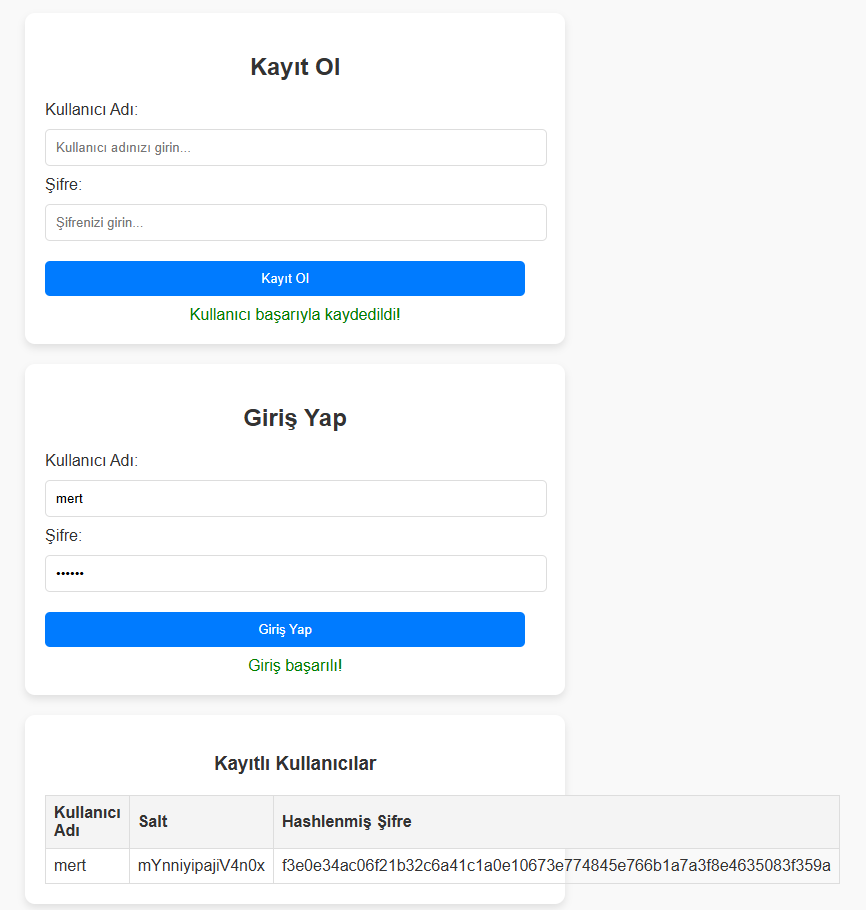
This is exactly the kind of problem salting is effective against. Even a very simple password, when stored with a salt value known only to us and verified using the same method, ends up being stored much more securely.
In the salting example below I used the username mert and the password 123456, same as in the hashing example above. Looking at the database records for the two methods, you can see the password is stored differently in each case. Salting stores the password alongside an extra value known only to us, which makes password storage considerably more secure.
<!DOCTYPE html>
<html lang="en">
<head>
    <meta charset="UTF-8">
    <meta name="viewport" content="width=device-width, initial-scale=1.0">
    <title>Salting ve Doğrulama</title>
    <style>
        body {
            font-family: Arial, sans-serif;
            margin: 20px;
            background-color: #f9f9f9;
            color: #333;
        }
        .container {
            max-width: 500px;
            margin: auto;
            padding: 20px;
            background-color: #fff;
            box-shadow: 0 4px 8px rgba(0, 0, 0, 0.1);
            border-radius: 10px;
            margin-bottom: 20px;
        }
        h2, h3 {
            text-align: center;
        }
        input[type="text"], input[type="password"], button {
            width: calc(100% - 20px);
            padding: 10px;
            margin: 10px 0;
            border: 1px solid #ddd;
            border-radius: 5px;
        }
        button {
            background-color: #007bff;
            color: #fff;
            border: none;
            cursor: pointer;
        }
        button:hover {
            background-color: #0056b3;
        }
        table {
            width: 100%;
            border-collapse: collapse;
            margin-top: 20px;
        }
        table, th, td {
            border: 1px solid #ddd;
        }
        th, td {
            padding: 8px;
            text-align: left;
        }
        th {
            background-color: #f4f4f4;
        }
        .error {
            color: red;
            text-align: center;
        }
        .success {
            color: green;
            text-align: center;
        }
    </style>
</head>
<body>

<div class="container">
    <h2>Kayıt Ol</h2>
    <label for="username">Kullanıcı Adı:</label>
    <input type="text" id="registerUsername" placeholder="Kullanıcı adınızı girin...">
    <label for="password">Şifre:</label>
    <input type="password" id="registerPassword" placeholder="Şifrenizi girin...">
    <button id="registerButton">Kayıt Ol</button>
    <div id="registerMessage"></div>
</div>

<div class="container">
    <h2>Giriş Yap</h2>
    <label for="username">Kullanıcı Adı:</label>
    <input type="text" id="loginUsername" placeholder="Kullanıcı adınızı girin...">
    <label for="password">Şifre:</label>
    <input type="password" id="loginPassword" placeholder="Şifrenizi girin...">
    <button id="loginButton">Giriş Yap</button>
    <div id="loginMessage"></div>
</div>

<div class="container">
    <h3>Kayıtlı Kullanıcılar</h3>
    <table>
        <thead>
            <tr>
                <th>Kullanıcı Adı</th>
                <th>Salt</th>
                <th>Hashlenmiş Şifre</th>
            </tr>
        </thead>
        <tbody id="userTable"></tbody>
    </table>
</div>

<script>
    const database = []; // Array to hold users (mock database)

    // Function to generate a random salt
    function generateSalt(length = 16) {
        const characters = 'ABCDEFGHIJKLMNOPQRSTUVWXYZabcdefghijklmnopqrstuvwxyz0123456789';
        let salt = '';
        for (let i = 0; i < length; i++) {
            salt += characters.charAt(Math.floor(Math.random() * characters.length));
        }
        return salt;
    }

    // Hashing function using SHA-256
    async function hashPassword(data) {
        const encoder = new TextEncoder();
        const encodedData = encoder.encode(data);
        const hashBuffer = await crypto.subtle.digest('SHA-256', encodedData);
        const hashArray = Array.from(new Uint8Array(hashBuffer));
        return hashArray.map(byte => byte.toString(16).padStart(2, '0')).join('');
    }

    // Registration flow
    document.getElementById('registerButton').addEventListener('click', async () => {
        const username = document.getElementById('registerUsername').value;
        const password = document.getElementById('registerPassword').value;

        if (!username || !password) {
            document.getElementById('registerMessage').textContent = 'Lütfen tüm alanları doldurun!';
            document.getElementById('registerMessage').className = 'error';
            return;
        }

        const salt = generateSalt(); // Generate a new salt
        const saltedPassword = password + salt; // Append the salt to the password
        const hashedPassword = await hashPassword(saltedPassword); // Hash the salted password

        // Save to the database
        database.push({ username, salt, hashedPassword });

        // Show a message
        document.getElementById('registerMessage').textContent = 'Kullanıcı başarıyla kaydedildi!';
        document.getElementById('registerMessage').className = 'success';

        // Refresh the table
        updateUserTable();

        // Clear the fields
        document.getElementById('registerUsername').value = '';
        document.getElementById('registerPassword').value = '';
    });

    // Sign-in flow
    document.getElementById('loginButton').addEventListener('click', async () => {
        const username = document.getElementById('loginUsername').value;
        const password = document.getElementById('loginPassword').value;

        if (!username || !password) {
            document.getElementById('loginMessage').textContent = 'Lütfen tüm alanları doldurun!';
            document.getElementById('loginMessage').className = 'error';
            return;
        }

        // Look the user up in the database
        const user = database.find(user => user.username === username);

        if (!user) {
            document.getElementById('loginMessage').textContent = 'Kullanıcı adı veya şifre hatalı!';
            document.getElementById('loginMessage').className = 'error';
            return;
        }

        // Hash the salted password and compare
        const saltedPassword = password + user.salt;
        const hashedPassword = await hashPassword(saltedPassword);

        if (hashedPassword === user.hashedPassword) {
            document.getElementById('loginMessage').textContent = 'Giriş başarılı!';
            document.getElementById('loginMessage').className = 'success';
        } else {
            document.getElementById('loginMessage').textContent = 'Kullanıcı adı veya şifre hatalı!';
            document.getElementById('loginMessage').className = 'error';
        }
    });

    // Update the user table
    function updateUserTable() {
        const tableBody = document.getElementById('userTable');
        tableBody.innerHTML = ''; // Clear the existing table

        database.forEach(user => {
            const row = document.createElement('tr');
            const usernameCell = document.createElement('td');
            const saltCell = document.createElement('td');
            const hashCell = document.createElement('td');

            usernameCell.textContent = user.username;
            saltCell.textContent = user.salt;
            hashCell.textContent = user.hashedPassword;

            row.appendChild(usernameCell);
            row.appendChild(saltCell);
            row.appendChild(hashCell);
            tableBody.appendChild(row);
        });
    }
</script>

</body>
</html>
4. Slow Hashing
Slow hashing means intentionally using hashing algorithms that slow the hashing process down, so that brute-force attacks become costly and time-consuming. Algorithms such as bcrypt, Argon2, and PBKDF2 are commonly used for this purpose. Unlike standard hashing algorithms, these slow hashes include a “work factor” or cost parameter. This parameter determines how much computation is required to compute each hash. The higher the work factor, the longer it takes to compute a hash, which makes it impractical for attackers to carry out large-scale brute-force attacks.
<!DOCTYPE html>
<html lang="en">
<head>
    <meta charset="UTF-8">
    <meta name="viewport" content="width=device-width, initial-scale=1.0">
    <title>Slow Hashing (bcrypt) ve Doğrulama</title>
    <!-- Correctly include the bcryptjs library -->
    <script src="https://cdnjs.cloudflare.com/ajax/libs/bcryptjs/3.0.6/bcrypt.min.js"></script> <!-- We included the correct bcryptjs library -->
    <style>
        body {
            font-family: Arial, sans-serif;
            margin: 20px;
            background-color: #f9f9f9;
            color: #333;
        }
        .container {
            max-width: 500px;
            margin: auto;
            padding: 20px;
            background-color: #fff;
            box-shadow: 0 4px 8px rgba(0, 0, 0, 0.1);
            border-radius: 10px;
            margin-bottom: 20px;
        }
        h2, h3 {
            text-align: center;
        }
        input[type="text"], input[type="password"], button {
            width: calc(100% - 20px);
            padding: 10px;
            margin: 10px 0;
            border: 1px solid #ddd;
            border-radius: 5px;
        }
        button {
            background-color: #007bff;
            color: #fff;
            border: none;
            cursor: pointer;
        }
        button:hover {
            background-color: #0056b3;
        }
        table {
            width: 100%;
            border-collapse: collapse;
            margin-top: 20px;
        }
        table, th, td {
            border: 1px solid #ddd;
        }
        th, td {
            padding: 8px;
            text-align: left;
        }
        th {
            background-color: #f4f4f4;
        }
        .error {
            color: red;
            text-align: center;
        }
        .success {
            color: green;
            text-align: center;
        }
    </style>
</head>
<body>

<div class="container">
    <h2>Kayıt Ol</h2>
    <label for="username">Kullanıcı Adı:</label>
    <input type="text" id="registerUsername" placeholder="Kullanıcı adınızı girin...">
    <label for="password">Şifre:</label>
    <input type="password" id="registerPassword" placeholder="Şifrenizi girin...">
    <button id="registerButton">Kayıt Ol</button>
    <div id="registerMessage"></div>
</div>

<div class="container">
    <h2>Giriş Yap</h2>
    <label for="username">Kullanıcı Adı:</label>
    <input type="text" id="loginUsername" placeholder="Kullanıcı adınızı girin...">
    <label for="password">Şifre:</label>
    <input type="password" id="loginPassword" placeholder="Şifrenizi girin...">
    <button id="loginButton">Giriş Yap</button>
    <div id="loginMessage"></div>
</div>

<div class="container">
    <h3>Kayıtlı Kullanıcılar</h3>
    <table>
        <thead>
            <tr>
                <th>Kullanıcı Adı</th>
                <th>Salt</th>
                <th>Hashlenmiş Şifre</th>
            </tr>
        </thead>
        <tbody id="userTable"></tbody>
    </table>
</div>

<script>
    const database = []; // Array to hold users (mock database)

    // Registration flow
    document.getElementById('registerButton').addEventListener('click', async () => {
        const username = document.getElementById('registerUsername').value;
        const password = document.getElementById('registerPassword').value;

        if (!username || !password) {
            document.getElementById('registerMessage').textContent = 'Lütfen tüm alanları doldurun!';
            document.getElementById('registerMessage').className = 'error';
            return;
        }

        // Salting and hashing with bcrypt
        const saltRounds = 12; // Number of salt rounds for slow hashing
        const salt = await bcrypt.genSalt(saltRounds); // Generate a salt
        const hashedPassword = await bcrypt.hash(password, salt); // Hash the password with the salt

        // Save to the database
        database.push({ username, salt, hashedPassword });

        // Show a message
        document.getElementById('registerMessage').textContent = 'Kullanıcı başarıyla kaydedildi!';
        document.getElementById('registerMessage').className = 'success';

        // Refresh the table
        updateUserTable();

        // Clear the fields
        document.getElementById('registerUsername').value = '';
        document.getElementById('registerPassword').value = '';
    });

    // Sign-in flow
    document.getElementById('loginButton').addEventListener('click', async () => {
        const username = document.getElementById('loginUsername').value;
        const password = document.getElementById('loginPassword').value;

        if (!username || !password) {
            document.getElementById('loginMessage').textContent = 'Lütfen tüm alanları doldurun!';
            document.getElementById('loginMessage').className = 'error';
            return;
        }

        // Look the user up in the database
        const user = database.find(user => user.username === username);

        if (!user) {
            document.getElementById('loginMessage').textContent = 'Kullanıcı adı veya şifre hatalı!';
            document.getElementById('loginMessage').className = 'error';
            return;
        }

        // Compare against the bcrypt-hashed password
        const isPasswordCorrect = await bcrypt.compare(password, user.hashedPassword);

        if (isPasswordCorrect) {
            document.getElementById('loginMessage').textContent = 'Giriş başarılı!';
            document.getElementById('loginMessage').className = 'success';
        } else {
            document.getElementById('loginMessage').textContent = 'Kullanıcı adı veya şifre hatalı!';
            document.getElementById('loginMessage').className = 'error';
        }
    });

    // Update the user table
    function updateUserTable() {
        const tableBody = document.getElementById('userTable');
        tableBody.innerHTML = ''; // Clear the existing table

        database.forEach(user => {
            const row = document.createElement('tr');
            const usernameCell = document.createElement('td');
            const saltCell = document.createElement('td');
            const hashCell = document.createElement('td');

            usernameCell.textContent = user.username;
            saltCell.textContent = user.salt;
            hashCell.textContent = user.hashedPassword;

            row.appendChild(usernameCell);
            row.appendChild(saltCell);
            row.appendChild(hashCell);
            tableBody.appendChild(row);
        });
    }
</script>

</body>
</html>