What Is User Provisioning?
One of the most fundamental, and perhaps most important, responsibilities of Identity and Access Management (IAM) products is user provisioning. User provisioning is the process of creating, maintaining, updating, and deleting a user’s accounts and access across multiple applications or systems at the same time.

To better understand user provisioning, let’s walk through an example process. Suppose we work in the IT department of a large-scale company in Turkey with more than 250 employees. Our company is growing, new employees are constantly being hired, and departures are happening at a similarly fast pace. Creating Active Directory accounts for new hires, creating their accounts in business applications, and granting access turns into a very painful process for a company this size. This is exactly where IAM’s provisioning function comes in.
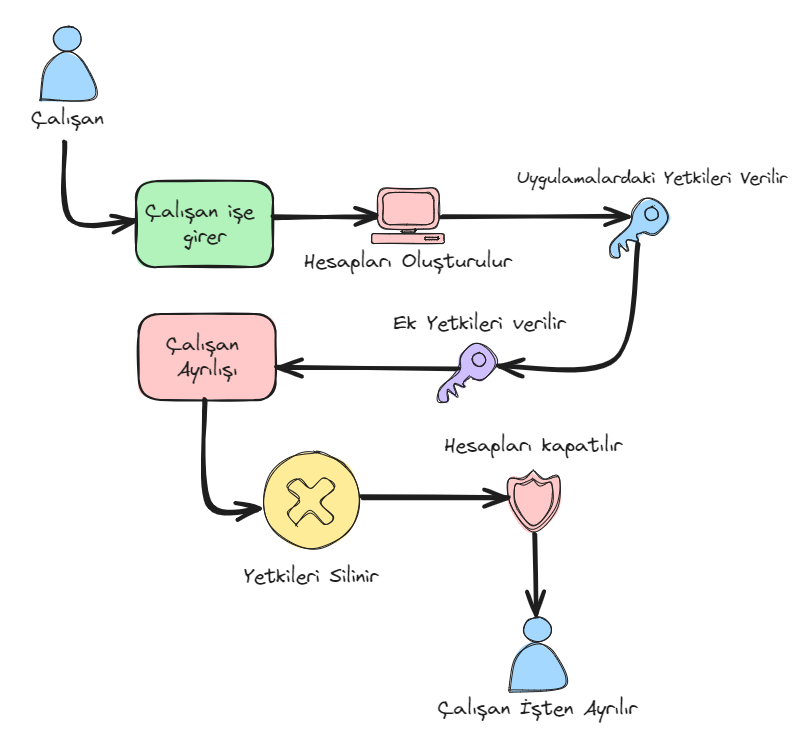
In our example scenario, once an employee’s data is entered into the Human Resources Management System (HRMS), our IAM product uses that information to automatically create the employee’s required accounts in Active Directory and all other applications. After creating the accounts, it grants the employee the privileges they should have and provisions those privileges. If the user needs additional privileges, the IAM product assigns or removes them through request management systems. Once an employee decides to leave the company, upon receiving the departure notification from the HRMS, IAM deletes the employee’s privileges and closes their accounts.
The key benefits that user provisioning via an IAM product brings to large-scale companies are as follows:
Security
- Ensures that accounts and privileges are created for the right people on the right resources.
- Updates or deletes accounts and privileges based on changes to underlying data.
Efficiency and Speed
- The automation process, by automatically creating, updating, and deleting user accounts, completely eliminates manual processes.
- Saves personnel time and effort. Ensures that a newly hired employee’s accounts are created instantly in the relevant applications.
Cost Savings
- Removing manual processes reduces the IT department’s workload.
- Automated processes have lower error rates.
Compliance and Audit
- Provides a centralized structure for record-keeping and regulatory compliance.
User Experience
- Ensures new employees’ or users’ accounts are created quickly.
- Gives users or employees faster access to the resources they request.
Centralized Management
- Managing user accounts and privileges from a single point makes operations more organized and controllable.
- Because it removes manual processes from the equation, human error is minimized and synchronization stays flawless.